Showing posts with label WEBSITES AND BLOG DESIGNING TRICKS. Show all posts

Direct Download Link Generator For Google Drive, Dropbox and Onedrive files.

  
** If direct link is not generated make sure java script is enabled. You can use This App To Do The Same Thing Too.**

How to create direct links with this tool?

  1. First you must obtain the share URL.
  2. Here is the guide to obtain Share link.
  3. Paste that link in the 'Enter Share link' textbox.
  4. Then, press Enter or click Generate.
  5. Press Ctrl + C to copy the direct link to your clipboard.

Important notes

  • You can save this page by pressing Ctrl + S and use it whenever you need.
  • This tool will work only for Google Drive, Dropbox and Onedrive links only.

5 Steps on How to Generate Direct Download links From Google Drive, Dropbox and OneDrive


You might have used Google drive, Dropbox or Onedrive to save your files and share them with your friends or public. Whenever you want to share some files, you will be given a URL Obviously, they are not direct links in the sense, those allow other users to visit one gateway page which contains a download link for any particular file. The user must use that to download files.Some of us would want to share the direct links for the files, so that any user can initiate the download just by clicking that hyperlink. You could do that easily. You just need to edit the share URL to make this happen. To make things a lot easier, I have created a tool by which you can generate direct download links for your files in Google drive, Dropbox and Onedrive.
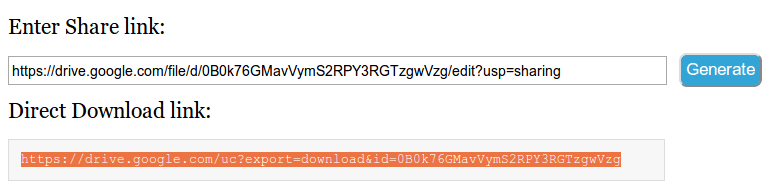
What you have to do is just copy the share URL of any file. Download Direct Download Link Generator For Google drive, Dropbox and onedrive App From PlayStore or Go to this page - Direct Download link generator for Google drive, Dropbox, Onedrive. Paste the share URL in the text box under "Enter Share link" and press Enter. Now, if you have entered a correct URL. A direct link would have been generated and selected. Press Ctrl + C to copy that URL. Just check the following image to know how it works.direct link generation for a google drive file
First of all, you must know how to obtain the share URL of your files from one particular web-app. Just use below links.
Note: You can't create direct download URLs for the folders you have in Google drive and Onedrive. Instead, you can compress the folders as .rar or .zip archive and you can create direct URLs for those files.

Google drive

As Google has updated the user interface of Google drive recently, I'm going to give instructions to obtain the share links in the new interface. To get the new drive just click the wrench in the top right corner of drive window and select 'Experience the new drive'.
  1. Right click the file you want to create download link, then select share.
  2. Now, click on 'Copy link' or select and copy the link shown on the popup window.
  3. Go to the page mentioned above, and paste the link you have copied.
  4. Direct download link would be created without any problem.

Dropbox

Unlike Google drive & onedrive you can create direct URLs for folders too.
  1. Login to Dropbox.
  2. Hover over the file you want to share directly and click 'Share' and then click on 'Copy link...'
  3. Use the link copied to create download link.
Note: You can simply create direct URLs for your Dropbox files by changing the '0' into '1' in the share URL.

Onedrive

  1. Right click the file, for which you want to create download URL, then select share.
  2. Then, click on 'Get a link'.
  3. Under 'Choose an option' select 'Public'.
  4. Click on 'Create link'.
  5. Now, you will be given a link. Use that to create direct link.
That's all. How's my work???'

Beware of Facebook Posts Asking Users to Type "Amen" or R.I.P to Help or Support Children, Adults or Animals


Beware of deceitful Facebook users who are posting pictures of sick, starving, dead and injured children, adults or animals on Facebook, to trick other Facebook users into commenting on them by typing "Amen," in order to make them popular. This type of activity is another Like-Farming scam, and the photos in them are being used without the owners' consent. The heartless and deceitful people who are tricking Facebook users into typing "Amen" are only taking advantage of caring Facebook users, who think they are helping out, by playing with their consciences. The scam may also ask Facebook users to compliment a child, an adult or an animal, or type "Amen" to be grateful for something.


Scammers use the posts to gather up potential victims. Once they have enought Facebook users, they will start sending them spam (unsolicited messages) with links that will take potential victims to phishing websites that will steal their information, or malicious links that will take them to dangerous websites that will infect their computers with Spyware or Trojan horse. The scammers may also send fraudulent messages claiming that their potential victims are so-called lottery winners and they need to send money in order to claim their prizes.
The messages below are just some of the few examples used by deceitful Facebook users to trick other Facebook users into commenting on their fake posts:

    “don’t scroll without typing amen.”
    “if you woke up this morning and your thankful every day while being bless scroll down and type amen”
    “how many likes can she get?”
    “this baby still cute, scroll if your heartless”
    “ignore if your heartless”
    “keep scrolling if your heartless”
    "Ignore If You Have No Heart"
    "PLEASE DONT IGNORE"
    "Don't scroll without saying R.I.P"
    "This is so sad type AMEN and lets see how many amen's and likes he can get"
    "Don't scroll without showing respect"
    "Please don't scroll down without saying "Amen"
    "Don't Press Watch Without Typing Amen"
    "1 like = 1000 prayers Don't scroll without typing amen"
    "Would You Save Your Mother? Type Yes Ignore NO"
    "Do you trust in prayers? If yes so please pray for this baby take a minute and type "Amen" your one amen is one pray if you don't love children so you can skip this"

Also, if you have received a message stating Facebook will donate money to a child if you like, share or comment on some content, please do not follow the instructions in the message, instead, report it to Facebook. And, if you have already commented on Facebook posts with sick, starving and injured children, adults or animals that you are not able to determine the legitimacy of, please click here for instructions on how to remove those posts from your Facebook Wall and Timeline.

INTRODUCTION TO BLOGGING


What is a blog? 


The word “blog,” a contraction of “web log,” is an informational web page that consists of discrete units called “posts.” The term “log” comes from the history of nautical navigation and originally referred to a record of chronological events kept by a ship’s crew (Rettberg 30). Like a ship’s log, blogs on the web tend to maintain an ordered chronology, although they often unfold in reverse order. Blog posts are often shorter and less formal than other types of writing. 


Blogs can be personal, artistic, academic, or professional. It is a unique form of online publishing that creates opportunities for producing knowledge, sharing research, building social networks, developing
professionally, or documenting personal growth. toddbacile.wordpress.com


Composing a post


You want your blog to invite readers in and keep them coming back for updates. Great blogs are vibrant and visually interesting, but they are also thoughtful and purposeful. Every post matters for generating and holding attention. Consider the following principles when composing:

      Make a point. While posts do not require a formal thesis or claim, it is important to have an argument, opinion, or purpose in mind when you compose.

      Be concise. Use precise language and coherent syntax to make your posts easy to read.

      Post often. Blogs should be updated regularly to hold readers’ interest. Actively generate new and interesting content on a daily or weekly schedule.

      Consider inviting guest bloggers to appeal to diverse readers, broaden your blog’s scope, or refresh your own perspective on the project.

      Proofread. Careless mistakes and errors can distract readers and make you appear less credible as a writer.   
      Create visual interest. Consider which aspects of your content would pair well with visual elements such as photographs, figures, or videos. Break up large chunks of text with visual elements to make your blog more readable.


Using Multimedia


Audio and visual interest helps grab a reader’s attention. Blogs give writers the opportunity to use design, images, audio, and video to supplement their writing. Take advantage of these innovative ways to enhance your presentation! Here are some guidelines to have in mind when you choose your blog’s multimedia elements:

       Use appropriate content, size, and quality. Make sure your chosen images complement the layout of your text visually. Images should be easy to see without obstructing the text of a post. Choose the highest possible quality image while also making sure it is easy to load. You don’t want your readers squinting at blurry pixels, but you won’t want them to wait 10 seconds for something to load, either.

       When linking to an online video, consider using a screen shot from that video as your hyperlink. A screen shot can make a reader more likely to click on a link. It can provide a visual preview, as well as demonstrate the clip’s relevance to your post.

       Attribute your sources. Like ideas, images and videos are someone else’s intellectual property. Whenever possible, provide captions for the reader. Even a simple caption –
(Image courtesy of msnbc.com) – will help readers identify the object’s origins.


Using Hyperlinks


Hyperlinks are an important part of blogging and can really increase your credibility. They create a sense of conversation, act like citations in more informal circumstances, and demonstrate that you are engaged with other people’s work.  [add a line space here?]
§  Links to other news stories, scientific research, and biographical information for story’s interviewees


Tips To Maintain a Successful Blog


       Make post titles eye-catching but also reasonably accurate. 
o Example: “Trash Talk” is a post about waste management.

       Consider using the tag function in each post. This will help guide readers through your content thematically instead of chronologically. Keep tags consistent, including punctuation. For example, “African-American” and “African American” would be regarded as two different tags because of the hyphen.

       If your hosting platform allows, link to similar blogs in order to increase your traffic.

       Unlike other writing contexts, you may find it difficult to identify your audience when you are composing blog posts. If your blog is public, you could have a large, diverse, and even global readership. Be aware that you are potentially addressing people with very different knowledge bases and cultural assumptions than yours.

       Handle comments with care. As the blog’s creator, the way you handle dissenting or inflammatory voices sets the tone for your readers. Consider adjusting your platform’s comment settings if you need to regulate the conversation. For instance, requiring minimum identification to post a comment can address the problem of inappropriate posts by increasing a writer’s accountability. 


Examples of Blogs


Academic and Professional Blogs
       http://blogs.nicholas.duke.edu/ o Student, faculty, and alumni blogs related to Duke’s Nicholas School of the Environment.

       http://www.wired.com/category/elemental/ o The science blog of Wired magazine’s Deborah Blum.

       http://www.scotusblog.com/  o Updates and news from the Supreme Court of the United States.

       http://www.newyorker.com/online/blogs/culture/emily-nussbaum o Notes on arts and culture from the New Yorker’s TV critic.

Personal, Project-Based, and Narrative Blogs
       http://dooce.com/  o Although she was one of the first people fired for the content of her personal blog, Heather Armstrong has been updating it for over a decade. 

       http://fortydaysofdating.com/  o Two best friends decide to date for 40 days and record their interactions.

       http://www.greenkitchenstories.com/ o Vegetarian recipes and lifestyle tips plus glossy food photography. 

       http://ww2today.com/ o Martin Cherritt’s blog covers World War II one day at a time.

       http://blog.inkyfool.com/  o Collected musings on words, phrases, grammar, and rhetoric.

       http://maddieonthings.com/  o Theron Humphrey takes photographs of his coonhound, Maddie.

JavaScript Tricks: Edit Websites in Browser (Live)


Imagine a world where you are a God and have ultimate control on what happens and more importantly, how it happens. Seems too good a dream. Now it has come true, at least for the online world.

JavaScript tricks
Using this trick, you will be able to edit any webpage live in your browser as if it was a Wiki and change the details according to your wish. Yes, you read that right. You can edit Google or even Facebook for that matter right in your browser and that too without requiring any technical know-how or getting deep into hacking and cracking.

Here is an example picture demonstrating the Google Homepage edited by me to say that I own Google.
Edit Websites Browser

This is just an example. You can use it for anything like showing wrong traffic stats or for fooling people by showing that someone said something about them on Facebook or Twitter. It depends only on your creativity. But I would advise you to stay ethical and use it for entertainment purposes only.

(Mozilla Firefox does not support this. If you use Firefox, you can use the bookmarklets given at the end of this post. If you use Google Chrome and the code does not seem to work, precede it with "javascript:" without quotes.)

To use this trick, all you need to do is just copy the code given below and paste it in your address bar after you have opened the website you wish to edit. And start editing.

javascript:document.body.contentEditable%20=%20'true';%20document.designMode='on';%20void%200
You can capture a screenshot by pressing the Print Screen key or by using the Snipping Tool if you use Windows 7 or Windows Vista. If you wish to again make the website non-editable to give a more authentic look, copy and paste the code given below in the address bar after you are done editing (does not work in Firefox).

javascript:document.body.contentEditable%20=%20'false';%20document.designMode='off';%20void%200

Or, alternatively you can use the following bookmarklets by dragging them to your Bookmarks bar.

1.  Edit this Website

2.  Done Editing

The editing that you do will however be temporary as it is not server-sided. You can also save the modified website through your browser by File>Save. This works on all common web browsers including Chrome, Firefox, Opera and Internet Explorer.

JavaScript Tricks: Edit Websites in Browser (Live)


Imagine a world where you are a God and have ultimate control on what happens and more importantly, how it happens. Seems too good a dream. Now it has come true, at least for the online world.

JavaScript tricks
Using this trick, you will be able to edit any webpage live in your browser as if it was a Wiki and change the details according to your wish. Yes, you read that right. You can edit Google or even Facebook for that matter right in your browser and that too without requiring any technical know-how or getting deep into hacking and cracking.

Here is an example picture demonstrating the Google Homepage edited by me to say that I own Google.
Edit Websites Browser

This is just an example. You can use it for anything like showing wrong traffic stats or for fooling people by showing that someone said something about them on Facebook or Twitter. It depends only on your creativity. But I would advise you to stay ethical and use it for entertainment purposes only.

(Mozilla Firefox does not support this. If you use Firefox, you can use the bookmarklets given at the end of this post. If you use Google Chrome and the code does not seem to work, precede it with "javascript:" without quotes.)

To use this trick, all you need to do is just copy the code given below and paste it in your address bar after you have opened the website you wish to edit. And start editing.

javascript:document.body.contentEditable%20=%20'true';%20document.designMode='on';%20void%200
You can capture a screenshot by pressing the Print Screen key or by using the Snipping Tool if you use Windows 7 or Windows Vista. If you wish to again make the website non-editable to give a more authentic look, copy and paste the code given below in the address bar after you are done editing (does not work in Firefox).

javascript:document.body.contentEditable%20=%20'false';%20document.designMode='off';%20void%200

Or, alternatively you can use the following bookmarklets by dragging them to your Bookmarks bar.

1.  Edit this Website

2.  Done Editing

The editing that you do will however be temporary as it is not server-sided. You can also save the modified website through your browser by File>Save. This works on all common web browsers including Chrome, Firefox, Opera and Internet Explorer.